Tenda WiFi Adapter Price in Bangladesh: Model Comparison
| Model | Type | Best for | Key specs | Price (BDT) |
|---|---|---|---|---|
| W311MI | Nano USB adapter | Compact computer connection | Listed AX300; match W311MI v6 | 600 |
| U1 | USB Wi-Fi adapter | Basic USB Wi-Fi shortlist | Listed 300Mbps; verify revision | 900 |
| U2 | USB Wi-Fi adapter | High-gain design shortlist | Listed AX300; match U2 v5 | 1,200 |
| U18a AX1800 | Dual-band USB adapter | Wi-Fi 6 dual-band shortlist | AX1800; USB 3.0 | Quotation |
W311MI is listed at BDT 600, U1 at BDT 900 and U2 at BDT 1,200. Contact TechMe BD for the latest U18a price, which is listed on quotation. These amounts describe the adapters, not a router or an internet connection.
Which Tenda USB WiFi Adapter Fits Your Computer?
A USB Wi-Fi adapter connects your computer to a wireless network. It can add Wi-Fi to a desktop or provide an alternative to an existing laptop adapter. You still need a working wireless router or access point and an internet service for online access.
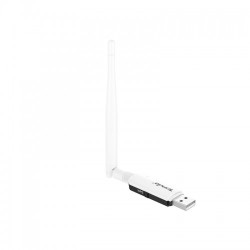
Start with your operating system and the available USB ports. Then consider where the computer sits relative to the router. A small nano adapter suits a compact installation. An external-antenna design gives you a different physical arrangement, but size alone cannot guarantee better reception.
W311MI, U1 and U2: Which Budget Option Should You Pick?
The W311MI listing uses the AX300 name. Tenda identifies W311MI v6 as an AX300 Wi-Fi 6 nano USB adapter. The U2 AX300 listing corresponds to a Wi-Fi 6 high-gain design in Tenda's U2 v5 range. Get the hardware revision on your quotation because older versions can have different specifications and driver needs.
U1 is listed as a 300Mbps USB Wi-Fi adapter. Compare its exact revision and supported operating systems before ordering. A wireless class or advertised rate tells you about the product category; it does not promise the internet speed your computer will receive.
If you only need basic access, begin with the lower-priced options and check compatibility first. If your requirements include dual-band Wi-Fi, compare an explicitly documented dual-band model. A Wi-Fi 6 label by itself does not establish that an adapter supports both frequency bands.
When Is Tenda U18a Worth Comparing?
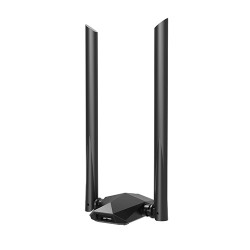
Tenda documents U18a as an AX1800 dual-band Wi-Fi 6 USB adapter with USB 3.0. That gives you a different connection shortlist from the compact budget entries. Match it to the router bands you intend to use and an appropriate USB port on the computer.
The official U18a datasheet names Windows 10 and Windows 11 support. For any other operating system, obtain a matching support reference before ordering. A claim of easy installation for one system does not establish driver support for every computer.
How to Choose Your Adapter
- Match the exact model and hardware revision to your operating system.
- Check driver availability before buying for Linux, macOS or an older Windows system.
- Choose the wireless bands supported by your router and required at your desk.
- Check the computer USB interface and space around adjacent ports.
- Compare the complete package and current quotation.
What Affects Speed, Coverage and Gaming?
Your router, broadband service and wireless environment affect the result. Walls, nearby networks and the computer position can weaken the connection. Test a practical location before expecting a different adapter to solve a weak upstream signal.
Wi-Fi 6 features require compatible support across the relevant devices. Connecting a newer adapter to an older router does not upgrade that router. For gaming or important calls, a suitable wired connection can avoid radio interference where practical. Network load, ISP routing and remote servers also affect latency.
Drivers, USB Connections and Extra Items
These are USB adapters, so a PoE switch or injector is not part of their normal power connection. Use the supported USB connection and manufacturer installation instructions. Include a suitable extension cable only if you need one and its compatibility has been established.
Ask which driver or setup method applies to your exact computer. Agree any requested setup assistance separately. Download software from the official manufacturer support source, keeping the model and hardware revision matched throughout.
Buying from TechMe BD
Read the Warranty Policy and keep your invoice and serial details for eligible claims. Coverage follows the selected product and applicable terms. Review the Online Delivery terms for delivery arrangements and charges.
Share your operating system, router model and preferred adapter when requesting a quotation. Browse the WiFi Adapter collection to compare other brands with the same computer requirements.
Frequently Asked Questions
What is the starting Tenda WiFi adapter price in Bangladesh?
The listed starting price is BDT 600 for W311MI. U1 is BDT 900 and U2 is BDT 1,200; U18a needs a current quotation.
Does a Tenda USB adapter replace my router?
No. It connects the computer to a wireless network. You still need the router or access point and an internet service for online access.
Will W311MI or U2 work with my operating system?
Match the full model and hardware revision to the official driver information. Support can differ between revisions, so provide your operating system before ordering.
Does Wi-Fi 6 always mean dual-band?
No. Check the supported frequency bands of the exact adapter. U18a is documented as dual-band; a Wi-Fi 6 label on another model is not enough to establish that feature.
Will a new adapter guarantee faster gaming?
No. Signal conditions, network load and the internet path affect latency. A suitable wired connection can help avoid wireless interference where practical.
Contact TechMe BD for the latest Tenda WiFi adapter price in Bangladesh and a quotation matched to your computer.