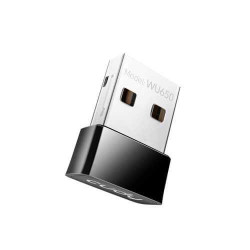
Cudy WiFi Adapter Price in Bangladesh: WU650
| Model | Type | Best for | Key specs | Price (BDT) |
|---|---|---|---|---|
| WU650 | USB Wi-Fi adapter | Compact desktop or laptop connection | Listed 650Mbps; dual-band; exact revision to match | 900 |
The Cudy WU650 listing is BDT 900. This category currently has one listed model, so there is no multi-model price range to compare here. Request the latest quotation and included package details before ordering.
Is Cudy WU650 Right for Your Computer?
A USB Wi-Fi adapter connects your computer to a wireless network. It can add Wi-Fi to a desktop without an internal wireless card. You can also compare it as an alternative connection for a laptop, provided the computer supports the exact adapter.
You still need a wireless router or access point. The adapter does not provide an internet subscription or replace the router. If your existing connection is slow, first identify whether the problem is reception, the computer or the broadband service.
The WU650 title identifies a 650Mbps dual-band USB adapter. Cudy lists WU650 hardware versions in its AC650 nano adapter range. Match the supplied hardware revision to the manufacturer information before choosing drivers or relying on version-specific features.
What Does Dual-Band Wi-Fi Mean for You?
Dual-band gives you options across the supported 2.4 GHz and 5 GHz networks. Your router must provide the band you want to use. Choose the connection that works reliably at your desk, considering the router location and the conditions between the devices.
The listed 650Mbps figure is a wireless class, not a promised download speed. The broadband service, router, computer and wireless link all affect the result. Buying an adapter with a larger advertised number alone does not resolve a slower internet connection.
How to Choose Your Cudy USB Adapter
- Check that your computer has an available suitable USB connection.
- Get the exact WU650 hardware revision on the quotation.
- Match official driver support to your operating system.
- Check the bands supported by your wireless router.
- Confirm the package and any requested setup assistance.
Drivers and Operating-System Compatibility
Provide your operating system before ordering. Compatibility can differ across hardware revisions and software releases. For Linux, macOS or an older Windows installation, obtain a matching official support reference for the supplied version.
Download the driver from the official manufacturer support source. Match both the model and hardware revision when selecting files. A driver intended for another WU model is not evidence that it supports your WU650.
If you are replacing a failed built-in adapter, check the USB connection and available setup method first. Agree any installation assistance separately from the product price. This makes the equipment and service costs clear on the quotation.
USB Connections, Placement and Extra Items
WU650 is a USB adapter, so a PoE injector or PoE switch is not part of its normal power connection. Follow the instructions for the supplied device. Include an extension cable only if you need one and it is suitable for the connection.
Check the physical space around the USB port. A neighbouring connector or the computer case can affect where the adapter fits. Think about how you will use the computer each day, including whether the adapter will remain connected during travel.
Walls, interference and the computer position affect reception. A compact adapter cannot guarantee a fixed room count or floor area. Assess the signal where you work before expecting different hardware to solve a weak network connection.
Will WU650 Improve Calls or Gaming?
A working wireless connection is only part of the path. Shared network traffic, ISP routing and the remote server affect latency. For calls or gaming, use a suitable wired connection where practical to avoid wireless interference.
For wireless use, compare performance at the actual desk position. Keep the router location and client conditions in mind. A product label alone cannot establish the connection quality your application will receive.
Buying from TechMe BD
Read the Warranty Policy and keep your invoice and serial details for eligible claims. Coverage follows the selected product and applicable terms. Review the Online Delivery terms for delivery arrangements and charges.
Share your computer type, operating system and router model when requesting a quotation. Browse the WiFi Adapter collection if you need a different connection type or wireless specification. Compare alternatives against the same requirements.
Frequently Asked Questions
What is the Cudy WiFi adapter price in Bangladesh?
The WU650 listing at TechMe BD is BDT 900. Request a current quotation for the exact hardware version and package.
Does WU650 replace my Wi-Fi router?
No. It connects your computer to a wireless network. You still need a router or access point and an internet service for online access.
Does 650Mbps mean I will download at that speed?
No. It is the listed wireless class, not a guaranteed internet rate. Your broadband, router, computer and wireless conditions affect practical speed.
Will WU650 work with Linux or macOS?
Check the official driver support for the exact hardware revision and operating-system release. Provide those details before ordering so the intended version can be matched.
Do I need a PoE adapter to use WU650?
No. This is a USB Wi-Fi adapter using its supported computer connection. Follow the installation instructions for the supplied device.
Contact TechMe BD for the latest Cudy WiFi adapter price in Bangladesh and a WU650 quotation matched to your computer.