


What Are You Trying to Connect?
Perhaps the Wi-Fi reaches the living room but drops at your desk. Or your office has gained two computers and run out of cable ports. Those problems call for different purchases. Start with the connection you want to improve, then choose the equipment.
A router manages the connection between networks. A switch adds wired connections within your local network. An access point provides Wi-Fi access to that network. You may need more than one of these, but buying another router is not the answer to every connection problem.
Networking Products Price in Bangladesh: Five Examples
| Model | Type | Best for | Key details | Price (BDT) |
|---|---|---|---|---|
| HG1 | ONU / ONT | ISP-approved fiber connection | Single-port XPON; Gigabit wired LAN | 1,300 |
| SG105 | Ethernet switch | Adding wired device connections | 5 Gigabit Ethernet ports | 1,550 |
| MW3 (3-pack) | Mesh Wi-Fi system | Adding Wi-Fi access locations | Store listing: 3-pack; AC1200 | Quotation |
| W311MI | USB Wi-Fi adapter | Connecting a compatible computer | Store listing: AX300; revision to match | 600 |
| 34-3011BL | Patch cord | Short wired equipment connection | Store listing: 1 metre Cat6 LSZH UTP | 350 |
These are five examples from the store, covering different jobs. They are not interchangeable products or a national best-seller ranking. Amounts are listed product prices; request the current package and final quotation before ordering.
For a Home With Patchy Wi-Fi
Before replacing anything, try a suitable wired connection near the router. If that works well while a distant room struggles, focus on the wireless layout. Moving an access location or adding a suitable access point may be more useful than changing the internet package.
Mesh is another option when you need several Wi-Fi access locations. The listed Tenda MW3 package contains three units and requires a quotation. Plan where the units can connect effectively. Walls, interference and the links between units affect the result, so there is no fixed room-count promise.
Port speed deserves a place on your shortlist too. For broadband above 100 Mbps, suitable Gigabit WAN and LAN connections avoid a Fast Ethernet bottleneck. Wireless classes such as AC1200 describe wireless capability, not the internet download speed one phone will receive.
When the Office Runs Out of Ports
Count the computers, printer and other wired devices, then allow a connection back to the existing network. The Tenda SG105 has five Gigabit Ethernet ports and is listed at BDT 1,550. One port used for the uplink leaves four for other connections.
If the plan includes powered cameras or access points, consider PoE separately. You need the correct power standard, enough powered ports and sufficient total power budget. An ordinary Ethernet switch does not become a PoE model because its ports look the same.
A larger office may also need management features, separate network segments or faster uplinks. Write down those requirements before comparing model prices. A small desktop switch and a managed installation switch can serve very different plans.
If Your Broadband Arrives Over Fiber
An ONU or ONT belongs at the fiber service connection. Tenda identifies HG1 as a single-port XPON ONT with a Gigabit wired LAN port. The store lists it at BDT 1,300. Ask your ISP whether the exact device can be provisioned on your service before replacing existing equipment.
OLT equipment sits on the service-provider side of a PON network. It is not a substitute for a home ONU. Optical modules and passive fiber parts also need their own compatibility checks, including the host equipment, connector and intended optical link.
The Small Parts Still Matter
The Safenet 34-3011BL is listed at BDT 350 as a one-metre Cat6 LSZH UTP patch cord. A ready-made short lead suits a different job from a bulk cable roll. Measure the route and leave practical space at equipment connections before choosing the length.
For a computer without suitable wireless connectivity, a USB Wi-Fi adapter may be the missing part. The W311MI listing is BDT 600 and names an AX300 version. Match the exact hardware revision and operating-system support; a shared model name is not enough to identify every version.
For a fixed work or gaming desk, a suitable wired connection is worth considering. Wi-Fi performance depends on the client and radio conditions. Internet latency also depends on the ISP route and destination server, so new hardware alone cannot promise lower ping.
Put the Whole Setup on One Quotation
- Your broadband package and existing equipment model.
- The number of wired devices and rooms needing Wi-Fi.
- Cable routes, power points and intended mounting locations.
- Required PoE equipment, adapters, cabling and installation work.
Send that list to TechMe BD with the models you are considering. Request separate amounts for devices, accessories and any agreed setup work. This makes a complete installation easier to compare than a device-only headline price.
Warranty coverage follows the selected product and applicable brand terms. Read the Warranty Policy and keep your invoice and serial details. The Online Delivery terms explain arrangements and charges for your order.
A Few Questions Before You Choose
What is the starting price of networking products in Bangladesh?
This category combines consumables, cables and complete devices, so one starting amount would be misleading. Compare prices within the equipment type you actually need.
Do I need a router or a switch for more computers?
A switch adds wired connections to an existing local network. You still need suitable routing equipment for the connection between that network and the internet.
Will a mesh system make my internet package faster?
Mesh adds Wi-Fi access locations. Your broadband package, wired interfaces, client devices and network conditions still limit usable speed.
Can I replace my fiber ONU myself?
Ask your ISP about the exact replacement and provisioning process first. Physical connector fit alone does not establish service compatibility.
Does the quotation include installation and delivery?
Ask for those items separately so the total is clear. Setup work must be agreed, and delivery charges depend on the order and arrangements.
Compare networking products price in Bangladesh around your actual setup, then contact TechMe BD for a model-specific quotation.

- Data Rate: 300Mbps
- 4*5dBi external antennas
- 3 x LAN, 1 x WAN Port
- 01-year official warranty
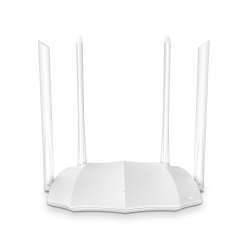
- 6dBi External antenna*4
- WPS/Reset button*1
- WiFi on/off button*1
- 01 year official warranty

- Data Rate: Up to 300Mbps
- 3*5dBi external antennas
- 3 x LAN, 1 x WAN Port
- 01-year official warranty
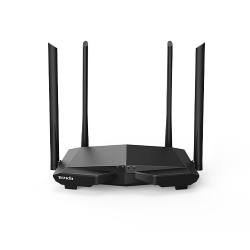
- Frequency: 2.4 & 5GHz
- 4*5dBi external antennas
- 1x WAN & 3x LAN Ports
- 01-year official warranty

- 4* 6dBi External Antennas
- Support MU-MIMO
- Dual-Band: 2.4GHz & 5GHz
- 01-year official warranty

- 5*6dbi external antennas
- 2.4 GHz: 574 Mbps
- 5 GHz: 2402 Mbps
- 01-year official warranty

- 6*6dbi external antennas
- 2.4 GHz: 574 Mbps (802.11ax)
- 5 GHz: 2402 Mbps (802.11ax, HE160)
- 01-year official warranty

- 5x 6dBi External Antennas
- 2.4GHz: Up to 300Mbps
- 5GHz: Up to 1201Mbps
- 01-year official warranty

- 4x 6dBi external antennas
- 2.4GHz: Up to 574Mbps
- 5GHz: Up to 2402Mbps
- 01-year official warranty
- 4x 6dBi external antennas
- 2.4GHz: Up to 574Mbps
- 5GHz: Up to 2402Mbps
- 01-year official warranty

- XPON Supported ONU
- 1 RESET Button
- LED Indicator: LAN, LOS, PON, PWR
- 03-years official warranty

- Button: 1 x Reset Button
- Antenna: 2 x Internal antenna
- 1 x Tri-color LED Indicator (Green, Yellow, Red)
- Ethernet Interface: 2 x 10/100Mbps RJ45 ports per node

- Driver-free installation for Windows; drivers available for Linux and UOS
- Frequency Bands: 2.4GHz
- Maximum Speed: Up to 286 Mbps
- Wi-Fi Generation: Wi-Fi 6
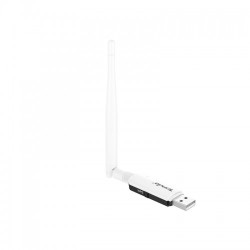

- Interfaces: USB 2.0
- Frequency: 2.4GHz
- Data Rate: 2.4GHz: Up to 286Mbps
- Wireless Modes: Station Mode, SoftAP Mode

- Distance of up to 5km
- Sound and Light Alarm
- 12dbi Directional Antenna
- 01-year official warranty

- 1 × 10/100 Mbps Ethernet Port
- VPN Passthrough Support
- Power, PoE/LAN, LED1, LED2, LED3
- Supports VLAN tagging for SSID

- Plug-and-play without configuration
- Store-and-forward forwarding mode
- 10/100 Mbps speed
- 01-year official warranty

- Supports 10/100M full duplex and half duplex
- Supports connecting with an IP camera
- Store-and-forward forwarding mode
- 01-year official warranty

- Supports Auto MDI / MDIX
- Plug and play, no configuration required
- Set up a 10/100 Mbps Fast Ethernet network
- 01 Year Official Warranty