MikroTik Access Point Models and Prices
| Model | Type | Best for | Key specs | Price (BDT) |
|---|---|---|---|---|
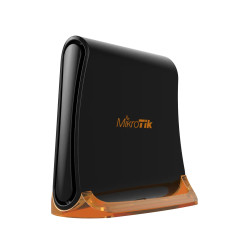
| RB931-2ND / hAP mini | Wireless router/AP | Basic desktop Wi-Fi | 2.4 GHz; 3 Fast Ethernet ports | 2,850 |
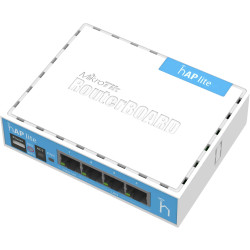
| RB941-2ND / hAP lite | Wireless router/AP | Home network shortlist | Exact package and revision to verify | 3,500 |
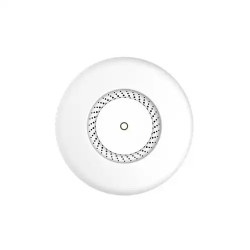
| RBCAP2ND / cAP | Ceiling access point | Ceiling installation shortlist | Listed Wireless N; exact code to verify | 5,570 |
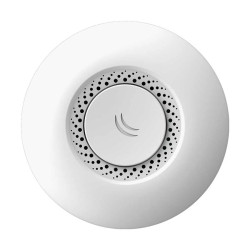
| CAP / cAP ac | Wall/ceiling access point | Dual-band network shortlist | Dual-band; 2 Gigabit Ethernet ports | 11,200 |
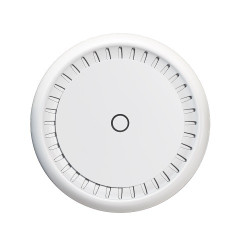
| CAP-2 / cAP XL ac | Wall/ceiling access point | Alternative cAP installation | Listed dual-band; exact code to verify | 11,500 |
Which MikroTik Access Point Should You Choose?
Choose the installation type first. You may need a small desktop device beside your existing network connection. A ceiling or wall installation puts wireless access in a different position. The right choice starts with your rooms, cable routes and connected devices.
The hAP entries are wireless router/AP devices. The cAP entries are access points intended for wall or ceiling installations, depending on the model. Their roles overlap in some configurations, but the mounting and setup needs differ. Keep the existing gateway and the job of the new device clear.
MikroTik Access Point Price in Bangladesh: hAP and cAP Options
The listed hAP mini price is BDT 2,850. The RB941-2ND hAP lite entry is BDT 3,500. These desktop options give you a lower-priced shortlist than the cAP entries, but price alone does not tell you which connection fits your network.
The RBCAP2ND cAP listing is BDT 5,570. The cAP ac listing, stored under model CAP, is BDT 11,200. The cAP XL ac listing, stored under CAP-2, is BDT 11,500. Ask for the full manufacturer code on the quotation because these short store labels do not identify every hardware detail.
These amounts are listed base product prices. They do not include a promised installation package. Compare the exact device and included items before deciding whether the total fits your budget.
hAP mini vs cAP ac: What Changes?
MikroTik documents hAP mini, RB931-2nD, with 2.4 GHz wireless and three 10/100 Ethernet ports. It is a compact wireless device for a different installation from a ceiling-mounted AP. Its Fast Ethernet connections matter if you want faster broadband or local transfers.
The official cAP ac description specifies dual-band 2.4 GHz and 5 GHz wireless, 802.11ac support and two Gigabit Ethernet ports. These interfaces offer a different shortlist for your wired network. Match the supplied manufacturer code to the cAP ac documentation before attaching those specifications to the store label CAP.
Your broadband speed still depends on the full connection path. A Fast Ethernet link limits usable throughput below its nominal 100 Mbps rate. A Gigabit port can support a faster wired link, but the gateway, switch, cables and clients also need suitable interfaces.
A Short Checklist Before You Buy
- Choose desktop, wall or ceiling placement around your cable route.
- Match Ethernet port speed to your broadband and local traffic.
- Decide whether you need 2.4 GHz only or dual-band wireless.
- Get the complete model code and included power items on the quotation.
- Agree who will configure the device and maintain the network.
PoE, Cabling and Extra Items for Your Quotation
Power requirements vary across these devices. The hAP mini datasheet specifies a 5 V input. A PoE feature on another MikroTik product does not establish the same power method here. Use the instructions for the exact device and identify its compatible adapter or injector.
For a PoE installation, distinguish receiving power from supplying power to another device. Match voltage, supported standard and connected-device requirements. With several powered access points, the switch needs enough power on each port and across its total power budget.
List cables, mounting items and any required power equipment separately. Include configuration work if you need it. This helps you compare complete quotations without mistaking a device-only price for a ready-to-use installation.
What Affects Wi-Fi Coverage and Everyday Speed?
Walls, interference and placement affect the signal your devices receive. Antenna count cannot guarantee a fixed number of rooms. Place access points near the areas they serve and assess the signal before expanding the installation.
An advertised wireless rate is not your internet download speed. Your clients, shared traffic and wired network also affect results. For calls or gaming, use a suitable wired connection where practical. ISP routing and remote servers affect latency as well.
Buying Your MikroTik Access Point from TechMe BD
Review the Warranty Policy and retain your invoice and serial details for eligible claims. Coverage follows the selected product and applicable terms. The Online Delivery terms explain arrangements and charges.
Share your broadband package, layout and model shortlist when requesting a quotation. Agree any setup assistance separately. You can also browse the Access Point collection to compare other brands for the same requirements.
Frequently Asked Questions
What is the starting MikroTik access point price in Bangladesh?
The listed starting price is BDT 2,850 for hAP mini. Prices in this selection reach BDT 11,500 for the cAP XL ac listing; request a current quotation for your exact package.
Should I choose hAP mini or a cAP model?
Choose around your installation. hAP mini is a compact desktop option, while the cAP shortlist is suited to planned wall or ceiling access locations, depending on the exact model.
Will hAP mini suit broadband above 100 Mbps?
Its documented Ethernet ports are 10/100 Mbps, which limits traffic using those links. Compare a suitable Gigabit model if your connection needs more wired capacity.
Does every listed MikroTik access point use the same PoE supply?
No. Power methods vary by device. Match the full model code and power instructions to the adapter, injector or switch in your quotation.
Can one access point cover every room?
Coverage depends on walls, placement and interference. Use your layout and practical signal checks to decide how many access locations you need.
Contact TechMe BD for a current MikroTik access point price in Bangladesh and an itemised quotation for your setup.