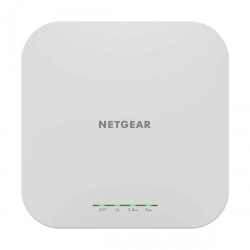
Which NETGEAR Access Point Fits Your Workplace?
Start with the places where people need Wi-Fi and where you can bring a network cable. A meeting room, open office and outdoor customer area may need different access locations. The right access point depends on the layout and connected devices, not only the highest advertised wireless rate.
An access point provides wireless access to the existing network. Plan the gateway, switch and cabling alongside it. If your current router already handles the broadband connection, identify where additional Wi-Fi is needed before deciding how many access points to install.
How Do WAX618 and WAX610Y Differ?
NETGEAR specifies WAX618 as an AX3000 dual-band Wi-Fi 6 access point with a 2.5G Ethernet connection. Listed at BDT 22,500, it is an option to compare when planning a multi-gigabit wired uplink. The switch port and cabling must also support the intended link speed.
WAX610Y is the outdoor model in this shortlist. NETGEAR documents AX1800 dual-band Wi-Fi 6 and an IP55-rated enclosure. Outdoor mounting still needs correct cable protection and installation practices; the enclosure rating does not establish a guaranteed coverage distance.
WAX610 is listed at BDT 24,500, while WAX620 and WAX628 are on quotation. Compare each exact model against its official documentation and the planned installation. Do not assume a higher model number or price automatically means a better result for every client or room.
The official WAX618 product page provides its model specifications. Keep the regional product code and actual package clear on the quotation, including the required power equipment.
Will a Multi-Gigabit Port Improve Your Connection?
A 2.5G uplink can provide more wired capacity than a Gigabit link when the rest of the connection supports it. It does not upgrade the broadband package or make every wireless client run at that rate. Compare the access point, switch, gateway and client interfaces as one connection path.
AX1800 and AX3000 are wireless classes, not promised internet download speeds for one device. Practical throughput depends on client support, radio conditions and shared traffic. Compatible clients are needed to use Wi-Fi 6-specific features; older supported devices do not gain those features just by connecting.
What Should You Include in the Installation Plan?
Check the supported PoE standard and power requirement of the exact model. For several access points, consider both the power available on each switch port and the total PoE budget. Include any required injector or adapter in the quotation rather than assuming it comes with every package.
For WAX610Y outdoors, NETGEAR instructs users to install an inline Ethernet surge protector when connecting to indoor equipment. Follow the manufacturer installation guide for cable protection and mounting. Arrange outdoor work with the appropriate installation requirements in mind.
Walls, interference and placement affect coverage. Plan access points near the areas they serve instead of relying on antenna count or a fixed room-count claim. For important calls or gaming, a suitable wired connection can avoid wireless interference where practical; ISP routing and remote servers still affect latency.
If you want Insight remote management, verify the required account, applicable subscription terms and included entitlement for the exact product and region. Agree configuration assistance separately. A management feature name does not establish a lifetime service entitlement.
NETGEAR Access Point Price in Bangladesh
Current priced examples are WAX618 at BDT 22,500 and WAX610 at BDT 24,500. Contact TechMe BD for the latest price of WAX610Y, WAX620 and WAX628, which are listed on quotation. Compare exact models and packages rather than treating quotation listings as a lower price tier.
Separate the access point price from switches, power accessories, cabling and installation work. Review the Warranty Policy and retain invoice and serial details for eligible claims. Coverage depends on the selected product and applicable brand terms.
The Online Delivery terms explain arrangements and charges. Browse the Access Point collection to compare other brands for the same layout and network requirements.
Frequently Asked Questions
What is the starting NETGEAR access point price in Bangladesh?
The current priced listings start at BDT 22,500 for WAX618. Other models may be on quotation; request the latest price and package details.
Which listed model is designed for outdoor use?
WAX610Y is the documented outdoor model with an IP55 enclosure. Follow its mounting and cable-protection instructions instead of treating indoor and outdoor models as interchangeable.
Does a 2.5G access point guarantee faster internet?
No. The broadband service, wired network and client capabilities also matter. A multi-gigabit port describes the interface capability, not a promised download speed.
Is Insight management included forever?
Do not assume a lifetime entitlement. Verify the applicable account, subscription and package terms for the exact regional product before choosing the management approach.
Share your installation layout and NETGEAR model shortlist with TechMe BD for a current equipment quotation.