Start with Your Network, Then Choose the Router
An office gateway that connects switches has a different job from a wireless router serving nearby laptops and phones. The Huawei models here span both roles. Draw a simple connection plan first: internet equipment, router, wired devices and any separate wireless access points. That makes the purchase easier to compare than choosing only by price or a Wi-Fi generation.
A fixed PC, camera system or network switch may depend on Ethernet, while users moving between rooms need a wireless access plan. Do not assume that every Huawei router provides built-in Wi-Fi or that one wireless device will cover an entire building.
Three Different Routes Through the Huawei Range
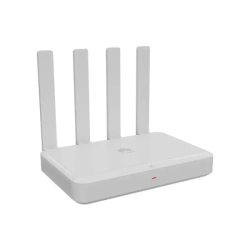
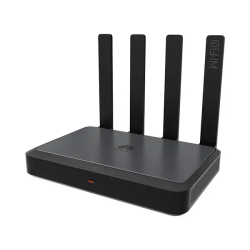
AR180 for a wireless-router shortlist. Huawei identifies AR180 as a Wi-Fi 7 enterprise-grade wireless router with four Gigabit electrical ports and one 2.5GE electrical port. Those interfaces have different limits; plan their roles rather than assuming every wired connection can run at 2.5G. The local AR180 listing currently requires a quotation. AR180 Plus and AR180 Pro should be checked as separate variants.
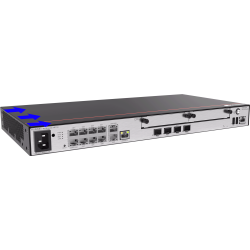
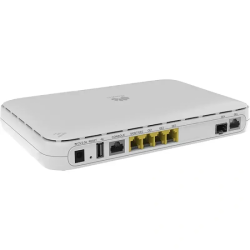
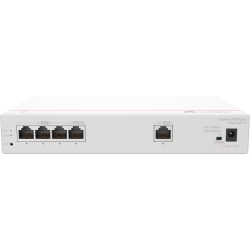
S380-L4P1T for a wired connection plan. Huawei specifies one Gigabit Ethernet WAN port and four Gigabit Ethernet LAN ports for this multi-service gateway. It is listed at BDT 41,800. Compare the required gateway and power functions for your installation instead of treating it as the same product type as an all-in-one wireless router.
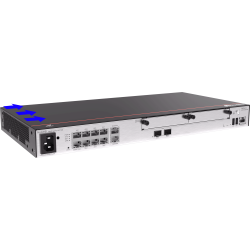
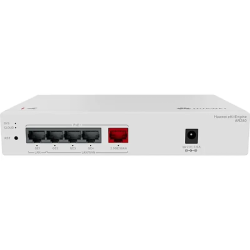
AR720 and AR730 for a business gateway comparison. The official AR700 datasheet distinguishes their WAN interfaces: AR720 has two GE combo WAN ports, while AR730 adds a 10GE optical WAN connection. Both have multiple Gigabit wired connections, but they are not interchangeable port layouts. Compare the exact model with the ISP handoff and downstream equipment before choosing.
The official Huawei AR180 specifications provide a reference for that wireless model. Product-family names and similar codes do not establish identical interfaces, management functions or package contents.
Where Speed and Compatibility Need a Closer Look
The WAN interface receives the internet connection; LAN interfaces connect your network equipment. For broadband above 100 Mbps, shortlist suitable Gigabit connections through the relevant path. Faster services need appropriate interfaces at every required link, including the ISP device, router, cable and client. One faster port does not upgrade all the other connections.
For an optical connection, establish the supported transceiver, cable and connector at both ends. A combo or optical port is not proof that the required module is supplied or that it matches every fibre service. The quotation should list any needed optics separately.
Wi-Fi 7 describes a wireless standard, not a guaranteed internet download speed. Compatible clients are needed for its specific capabilities. Walls, placement and interference affect wireless results; antenna count cannot guarantee a fixed room count or floor area. Where a wired gateway is selected, plan wireless access points separately.
For gaming, calls or other latency-sensitive work, use a suitable wired connection where practical. Over Wi-Fi, client support and radio conditions matter. Network load, ISP routing and the destination server also affect latency, so a business router or newer wireless generation is not a guarantee of lower ping.
Huawei Router Prices in BD and the Full Project Cost
Current priced examples are S380-L4P1T at BDT 41,800, AR720 at BDT 86,500 and AR730 at BDT 151,000. AR180, AR180 Plus, AR180 Pro, AR280 and AR303 need a current quotation. These are base listing amounts, not a final payable total or stock guarantee.
The useful comparison is the complete requirement: router, any separate access points, compatible modules, cabling and agreed configuration work. Ask for those items separately on the quotation. A more expensive gateway may offer different interfaces or functions, but it is not automatically the best match for every site.
Before You Place the Order
Review the Warranty Policy and retain the invoice and serial details for eligible claims. Coverage depends on the product and applicable terms. The Online Delivery terms explain arrangements for Dhaka and other locations; charges depend on the order and delivery arrangements.
Share the ISP handoff, required management functions and network plan for model-selection questions. Agree any requested configuration assistance separately, or browse the router collection when comparing other brands against the same requirements.
Quick Answers for Huawei Router Buyers
What is the starting Huawei router price in Bangladesh?
The current priced listings start at BDT 41,800 for S380-L4P1T. Other listed models may require a quotation; ask for the exact model and package price.
Does every listed Huawei router have Wi-Fi?
No. AR180 is a verified wireless model, while wired gateways need a separate wireless access plan if the installation requires Wi-Fi. Check the exact model rather than assuming one feature applies to the category.
Will a 2.5G or 10G port make every device faster?
No. Each link depends on the interfaces, configuration and connected equipment along the complete path. A Gigabit connection elsewhere remains a separate limit.
Are optical modules and installation included?
Do not assume they are. Request the supported modules, package contents and scope of any setup work on the quotation before accepting the complete order.
Send TechMe BD your preferred Huawei model and connection requirements for a current, model-specific quotation.